How to Build AI Agents with LangChain and CrewAI (The Complete 2026 Guide)

Table of Contents
We have entered the era of multi-agent systems. Building a single LLM wrapper is no longer enough. In 2026, engineering is about creating teams of autonomous agents that can plan, execute, and collaborate.
If you are looking into how to build AI agents, you have undoubtedly encountered the two giants in the Python ecosystem: LangChain and CrewAI.
My Hosting Choice
Need Fast Hosting? I Use Hostinger Business
This site runs on the Business Hosting Plan. It handles high traffic, includes NVMe storage, and makes my pages load instantly.
Get Up to 75% Off Hostinger →⚡ 30-Day Money-Back Guarantee
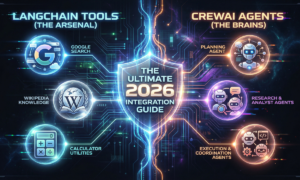
On paper, they seem like a perfect match. LangChain has the largest ecosystem of tools on the planet—it can connect to Google Search, SQL databases, Arxiv papers, and 300+ other APIs. CrewAI, on the other hand, has the best developer experience for orchestrating role-playing agents that work together sequentially or hierarchically.
But here is the reality check that most tutorials won’t tell you: connecting them is notoriously difficult for beginners.
If you try to plug a raw LangChain tool directly into a CrewAI agent, you will likely face vague Pydantic validation errors, schema mismatches, or agents that hallucinate how to use the tool.
The Goal of This Guide
This is not a theoretical overview of crewai vs langchain. This is a practical, code-heavy blueprint.
By the end of this guide, you will know exactly how to wrap LangChain community tools so that CrewAI agents can use them flawlessly. We will build a live “Tech Research Team” that can browse the real-time internet and write up-to-date reports autonomously.
The 2026 Agent Stack: Why Combine Them?
Before we write code, it is vital to understand the architecture. Why go through the trouble of combining two different frameworks? Why not just use one?
In the fast-moving landscape of python ai agents in 2026, specialization is key.
1. CrewAI: The Manager (Orchestration Layer)
CrewAI excels at defining roles and processes. It allows you to tell an LLM: “You are a Senior Researcher. You are thorough, factual, and sceptical.” It then handles the complex cognitive loops required for that agent to stay in character and collaborate with others. It is the “manager” of your digital workforce.
2. LangChain: The Toolbox (Integration Layer)
LangChain has spent years building integrations. If you need your AI to interact with the outside world—whether it’s scraping a website, querying a Notion database, or running complex math—LangChain already has a pre-built tool for it. It is the massive warehouse of capabilities.
The Integration Problem
The problem is that CrewAI agents expect tools to have very specific input schemas (definitions of what arguments the tool accepts). Many raw LangChain tools have complex schemas designed for LangChain’s own internal chains.
When you hand a complex LangChain tool to a CrewAI agent without preparation, it’s like handing a socket wrench to a carpenter looking for a hammer. The agent doesn’t know how to hold it.
Our job is to build the adapter.
Prerequisites and Environment Setup
To follow this guide on how to build ai agents with LangChain and CrewAI, you need a few things set up. We are using the latest 2026 library versions to ensure stability.
Required API Keys
To build a truly useful agent that can browse the web, we need external APIs.
- OpenAI API Key: For the LLM brains (Gpt-5 or any other preffered model like Gemini ).
- SerpApi Key: This allows our agents to perform real Google searches. You can get a free tier account at serpapi.com.
Note: I used Kaggle for this type of purposes as kaggle can handle it very well(Highly Recommended).
Installation
Create a new virtual environment (recommended for all building multi-agent systems python projects) and install the necessary dependencies.
# Create virtual environment
python -m venv venv
source venv/bin/activate  # On Windows use: venv\Scripts\activate

# Install the 2026 stack
pip install --upgrade crewai langchain-community google-search-results openai
Note: We install langchain-community specifically to access their vast tool repository.
Step 1: The Secret Sauce – Wrapping LangChain Tools
This is the most critical step in the entire tutorial. If you skip this, your agents will fail.
We are going to use the GoogleSerperAPIWrapper from LangChain. If you look at the LangChain documentation, this tool has several methods. CrewAI agents need a single, callable function with a clear description.
We will use the generic Tool class from langchain.tools to create a clean wrapper around the complex API functionality.
Create a file named main.py and start with imports and setup:
import os
from crewai import Agent, Task, Crew, Process

# Import LangChain community tools and the generic Tool wrapper
from langchain_community.utilities import GoogleSerperAPIWrapper
from langchain.tools import Tool

# --- Configuration ---
# Replace these with your actual API keys or load them from a .env file
os.environ["OPENAI_API_KEY"] = "your-openai-key-here"
os.environ["SERPER_API_KEY"] = "your-serpapi-key-here"

# --- Tool Initialization ---

# 1. Instantiate the raw LangChain utility
# This object knows how to talk to Google, but isn't ready for CrewAI yet.
search_utility = GoogleSerperAPIWrapper()

# 2. The Wrapping Step (Crucial)
# We create a new Tool object that exposes only the '.run' method of the utility.
# The 'description' is VITAL. It tells the AI agent *when* to use this tool.
search_tool = Tool(
    name="Google Search Function",
    func=search_utility.run,
    description="Useful for when you need to answer questions about current events, real-time data, or verify facts on the internet. Input should be a search query string."
)

print("LangChain Tool successfully wrapped for CrewAI.")
Why this works: We have taken a complex utility object and simplified it down to a single function (func=search_utility.run) and provided a clear natural language instruction for the AI (description="..."). This is the “adapter” that makes the integration seamless.
![a simple flow diagram. [Box: Raw LangChain Utility (Complex Schema)] -> connects to -> [Box: The "Wrapper" Tool (Simplified Schema/Description)] -> connects to -> [Box: CrewAI Agent Brain]. Caption: The wrapping process simplifies LangChain's tools so CrewAI agents can understand them.](https://devtechinsights.com/wp-content/uploads/2026/01/Gemini_Generated_Image_uuozf0uuozf0uuoz.png)
Step 2: Building the Agent Team (The Crew)
Now that we have our tool ready, we need to define our workforce. When exploring how to build ai agents, defining clear personas is half the battle.
We will create two agents:
Useful Links
- The Era of Small Language Models (SLMs): Why 2026 Belongs to Edge AI
- Microsoft AutoGen vs. CrewAI: I Ran a “Code Battle” to See Who Wins in 2026
- Beyond the Chatbot: Why 2026 is the Year of Agentic AI
- Why Developers Are Moving from ChatGPT to Local LLMs (2025)
- LangChain vs. LlamaIndex (2026): Which AI Framework Should You Choose?
- Toil is Back: Why Even with AI, SREs Feel the Burn in 2025
- Senior Research Analyst: This agent will have access to the
search_tool. Its job is to find raw data. - Tech Content Writer: This agent will not have tools. Its job is to synthesize the researcher’s findings into a readable format.
Add this code to main.py:
# --- Define Agents ---

# Agent 1: The Researcher (Armed with the LangChain tool)
# Notice the 'tools' parameter where we inject our wrapped tool.
researcher = Agent(
    role='Senior Tech Research Analyst',
    goal='Uncover cutting-edge developments in AI agent frameworks in 2026.',
    backstory="""You are an elite analyst at a top-tier tech consultancy.
    Your specialty is digging up hard-to-find facts and latest trends.
    You do not make assumptions; you verify everything with search data.""",
    verbose=True, # Allows us to see the agent's thought process in the terminal
    allow_delegation=False, # We want this agent to do the work itself
    tools=[search_tool], # <-- THE KEY INTEGRATION POINT
    llm="gpt-4-turbo-preview" # Using a strong model for complex tool usage
)

# Agent 2: The Writer (No tools, relies on internal knowledge and context)
writer = Agent(
    role='Senior Tech Blog Writer',
    goal='Craft engaging, easy-to-understand content about complex tech topics.',
    backstory="""You are a renowned tech communicator. You take complex research
    and break it down into digestible, engaging articles for developers.
    You rely on the information provided by the Researcher.""",
    verbose=True,
    allow_delegation=False,
    llm="gpt-4-turbo-preview"
    # Notice: No 'tools' list here.
)
Step 3: Defining the Mission (Tasks)
Agents without tasks are useless. In CrewAI, a Task connects a description of work to the agent responsible for doing it.
We will create a sequential workflow: Research first, then writing.
Add this to main.py:
# --- Define Tasks ---

# Task 1: The research request
task_research = Task(
    description="""Conduct comprehensive research on the current state of
    integrating 'LangChain tools with CrewAI agents' in early 2026.
    Find out what the major challenges are and if there are new standard approaches.
    Focus on finding factual, real-time information.""",
    agent=researcher,
    expected_output="A detailed bulleted list of key findings, current challenges, and 2026 trends regarding LangChain/CrewAI integration."
)

# Task 2: The writing request
# This task implicitly depends on the output of task_research because of the sequential process.
task_writing = Task(
    description="""Using the research provided by the Senior Tech Research Analyst,
    write a short, engaging LinkedIn post (approx 200 words) announcing the
    new best practices for combining these two frameworks. Use emojis and make it professional yet exciting for developers.""",
    agent=writer,
    expected_output="A Markdown-formatted LinkedIn post ready for publishing."
)
Step 4: The Main Execution Script
Finally, we assemble the crew and kick off the process. We will use a sequential process, meaning Task 1 must finish before Task 2 begins. The output of Task 1 is automatically passed as context to the Writer agent in Task 2.
Finish your main.py file:
# --- Assemble the Crew ---

tech_crew = Crew(
    agents=[researcher, writer],
    tasks=[task_research, task_writing],
    verbose=2, # High verbosity to see exactly what's happening
    process=Process.sequential
)

# --- Run the Workflow ---
print("### Starting the 2026 Agent Workflow ###")
result = tech_crew.kickoff()

print("\n\n########################")
print("## FINAL RESULT FROM CREW ##")
print("########################\n")
print(result)
Seeing it in Action (The “Proof”)
When you run this script (python main.py), pay close attention to the terminal output. This is the most satisfying part of learning how to build ai agents.
You will see the Researcher Agent “thinking.” It will realize it doesn’t know the 2026 trends internally. It will then decide to use the Google Search Function. You will see the actual search query it generates, and the snippet of data it gets back from Google.
It might search 2 or 3 times to gather enough information before synthesizing the final bulleted list.
Once finished, the Writer Agent takes over. It will not use any tools. It will simply read the research report and craft the LinkedIn post as requested.
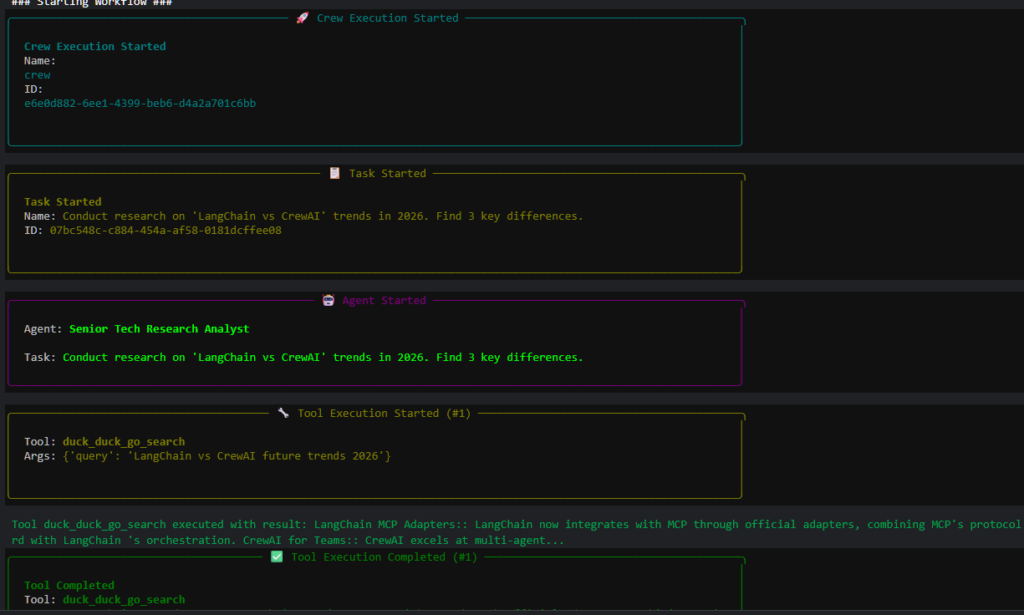
Note: Due to some issues in Serp Api, I have to switch to duck duck go. Below is the code which i used
import os
from crewai import Agent, Task, Crew, Process
from crewai.tools import BaseTool  # <--- The Native Class
from langchain_community.tools import DuckDuckGoSearchRun
from langchain_google_genai import ChatGoogleGenerativeAI

# --- KAGGLE SECRETS ---
try:
    from kaggle_secrets import UserSecretsClient
    user_secrets = UserSecretsClient()
    os.environ["GOOGLE_API_KEY"] = user_secrets.get_secret("GOOGLE_API_KEY")
except ImportError:
    # Use fallback if running locally
    os.environ["GOOGLE_API_KEY"] = "YOUR_API_KEY"

# --- LLM SETUP ---
llm = ChatGoogleGenerativeAI(
    model="gemini-2.5-flash",
    verbose=True,
    temperature=0.5,
    google_api_key=os.environ["GOOGLE_API_KEY"]
)
# Initialize the search engine
ddg_search = DuckDuckGoSearchRun()

# Define a Native CrewAI Tool
class MySearchTool(BaseTool):
    name: str = "DuckDuckGo Search"
    description: str = "Useful for searching the internet for facts and trends. Input should be a search query."

    def _run(self, query: str) -> str:
        # This function triggers when the agent uses the tool
        return ddg_search.run(query)

# Instantiate the tool
search_tool = MySearchTool()
# --- AGENTS ---

researcher = Agent(
    role='Senior Tech Research Analyst',
    goal='Uncover cutting-edge developments in AI agent frameworks in 2026.',
    backstory='You are an elite analyst. You verify everything with search data.',
    verbose=True,
    allow_delegation=False,
    tools=[search_tool],  # <--- Passing our native tool
    llm=llm
)

writer = Agent(
    role='Senior Tech Blog Writer',
    goal='Craft engaging, easy-to-understand content about complex tech topics.',
    backstory='You are a renowned tech communicator.',
    verbose=True,
    allow_delegation=False,
    llm=llm
)

# --- TASKS ---

task_research = Task(
    description="Conduct research on 'LangChain vs CrewAI' trends in 2026. Find 3 key differences.",
    agent=researcher,
    expected_output="A list of 3 key differences."
)

task_writing = Task(
    description="Write a short LinkedIn post about these differences.",
    agent=writer,
    expected_output="A LinkedIn post."
)

# --- CREW ---

tech_crew = Crew(
    agents=[researcher, writer],
    tasks=[task_research, task_writing],
    verbose=True,
    process=Process.sequential
)

# --- RUN ---
print("### Starting Workflow ###")
result = tech_crew.kickoff()
print(result)
and the Platform used was kaggle.
Advanced Techniques for 2026: Scaling Up
Once you master this basic integration, the possibilities for building multi-agent systems in python explode. Because you know how to wrap tools, you can now give your CrewAI agents access to almost anything.
1. Integrating Local LLMs (Ollama)
You don’t have to rely on OpenAI. In 2026, running local models like Llama 3 via Ollama is hugely popular for privacy and cost savings. You can easily configure CrewAI agents to use a local Ollama endpoint instead of GPT-4, making your agents completely free to run locally.
2. The “Wikipedia” Researcher
Want an agent that relies on established knowledge rather than real-time news? Install wikipedia and wrap the LangChain Wikipedia tool.
from langchain_community.tools import WikipediaQueryRun
from langchain_community.utilities import WikipediaAPIWrapper

# Initialize and wrap
wikipedia = WikipediaQueryRun(api_wrapper=WikipediaAPIWrapper())
wiki_tool = Tool(
    name="Wikipedia Search",
    func=wikipedia.run,
    description="Useful for querying historical facts, definitions, or established knowledge bases."
)
# Now add 'wiki_tool' to your agent's tools list.
3. Beyond Sequential: LangGraph vs CrewAI
While CrewAI is fantastic for these linear or hierarchical team structures, you might eventually need highly complex, cyclic flows (e.g., an agent that codes, tests, fails, tries again, tests again). For these complex state-machine flows, developers in 2026 are often looking at LangGraph.
However, the beauty of the modern ecosystem is that you don’t always have to choose. You can build a CrewAI team and wrap it as a single node inside a larger LangGraph application, getting the best of both worlds.
Conclusion
Knowing how to build AI agents with LangChain and CrewAI gives you a massive advantage as an AI engineer in 2026. You are no longer limited to the knowledge frozen inside the LLM’s training data.
By correctly wrapping LangChain’s vast community tools, you can empower CrewAI’s sophisticated agents to interact with the real world, databases, and complex APIs. You move from building simple chatbots to building autonomous systems that can do real work.
The key is always in the wrapper: simplify the interface and write a crystal-clear description so the agent knows when to use its new superpower.
Why do I get a Pydantic ValidationError when adding tools?
This is the most common error in 2026. It happens because LangChain and CrewAI sometimes use different versions of data validation logic (Pydantic V1 vs V2).
The Fix: Never pass a raw function or a LangChain tool directly to a CrewAI agent. Always wrap it using the @tool decorator or inherit from BaseTool as shown in Step 1 of this guide. This forces the tool to match CrewAI’s expected format.
Is this stack free to run?
The software itself (Python, CrewAI, LangChain) is 100% open-source and free. However, if you use OpenAI (GPT-4) and SerpApi, you will pay for API usage.
Zero-Cost Alternative: You can swap OpenAI for Ollama (to run Llama 3 locally) or Gemini Free and swap SerpApi for DuckDuckGo (as shown in the code above) to make this entire project free.
Why use CrewAI instead of just LangChain Agents?
LangChain is great for building single agents that use tools. CrewAI is built on top of LangChain specifically to manage teams of agents. If you want a “Researcher” to talk to a “Writer” and delegate tasks, CrewAI handles that orchestration much better than raw LangChain.

🚀 Let's Build Something Amazing Together
Hi, I'm Abdul Rehman Khan, founder of Dev Tech Insights & Dark Tech Insights. I specialize in turning ideas into fast, scalable, and modern web solutions. From startups to enterprises, I've helped teams launch products that grow.
- ⚡ Frontend Development (HTML, CSS, JavaScript)
- 📱 MVP Development (from idea to launch)
- 📱 Mobile & Web Apps (React, Next.js, Node.js)
- 📊 Streamlit Dashboards & AI Tools
- 🔍 SEO & Web Performance Optimization
- 🛠️ Custom WordPress & Plugin Development