Microsoft AutoGen vs. CrewAI: I Ran a “Code Battle” to See Who Wins in 2026

Table of Contents
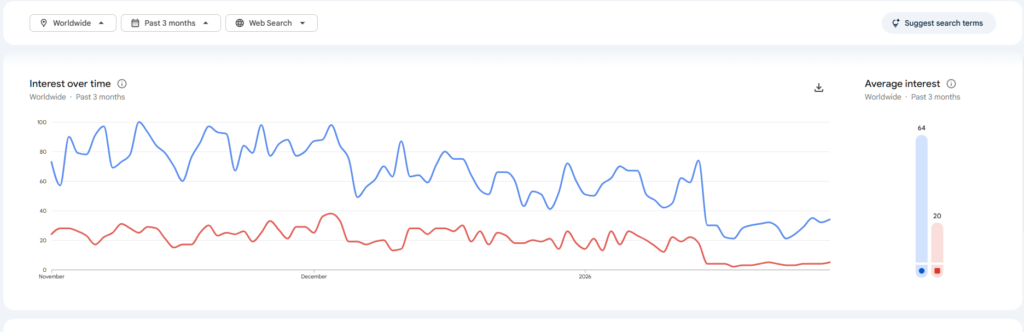
The data is alarming.
I was checking Gemini to search for my Blog Topic When Gemini told me to check for crew ai and when i checked the search trends for AI frameworks, I saw something that stopped me in my tracks. Microsoft AutoGen, the framework that dominated 2025, has crashed to single-digit search volume. Meanwhile, CrewAI is holding steady.
My Hosting Choice
Need Fast Hosting? I Use Hostinger Business
This site runs on the Business Hosting Plan. It handles high traffic, includes NVMe storage, and makes my pages load instantly.
Get Up to 75% Off Hostinger →⚡ 30-Day Money-Back Guarantee
Is everyone really abandoning AutoGen? Or is the data misleading?
I didn’t want to guess. So, I decided to test it myself.
I opened up my Kaggle Notebook(note;Even though i have decent setup but i use kaggle because it offers generous 30 Gpu hours) and set a simple challenge: “Build a Stock Market Analysis Agent in 30 minutes or less.” I built it once in AutoGen and once in CrewAI.
Here is exactly what happened during my test, and why I think the data is right.
The Challenge
The goal was simple. I wanted an AI agent that could:
- Search the web for the latest news on a specific company (e.g., Apple).
- Summarize the news into bullet points.
- Stop when finished.
It sounds easy. But as I found out during this test, “Stopping” is harder than you think.
Test 1: The AutoGen Experience
I started with Microsoft AutoGen. I installed the library and set up the standard “UserProxy” pattern.
The Code: Right away, the boilerplate felt heavy. To make the agent work, I had to configure a “UserProxy” (a fake user) to trigger the “Assistant.”
(Note: with the advancement in AI, Now we don’t have to write code ourselves. Therefore, I gave Gemini a chance
#Code From My Test
# PRE-REQUISITES (Add this command at the top of your notebook)
# !pip install pyautogen duckduckgo-search

import warnings
warnings.filterwarnings('ignore')
import os
from autogen import AssistantAgent, UserProxyAgent, register_function
from duckduckgo_search import DDGS

# --- 1. Define the Tool ---
def get_news(query: str) -> list:
    """Searches for latest news using DuckDuckGo."""
    print(f"\n[DEBUG] Searching for: {query}...")
    try:
        results = list(DDGS().news(keywords=query, max_results=3))
        return results
    except Exception as e:
        return [{"error": str(e)}]

# --- 2. Configuration ---
# Note: We use Gemini Flash because it is fast and free/cheap
llm_config = {
    "config_list": [
        {
            "model": "gemini-2.5-flash",
            "api_key": "YOUR_GOOGLE_API_KEY", # <--- User replaces this
            "api_type": "google"
        }
    ]
}

# --- 3. The Assistant ---
assistant = AssistantAgent(
    name="Analyst",
    llm_config=llm_config,
    system_message="""
    You are a News Analyst.
    1. Call `get_news` to get the latest data.
    2. Once you receive the data, DO NOT write Python code.
    3. Simply output a Markdown table summarizing the news.
    4. Include columns: Date, Title, Source.
    5. Reply TERMINATE after the table.
    """
)

# --- 4. The Proxy ---
user_proxy = UserProxyAgent(
    name="User_Proxy",
    human_input_mode="NEVER",
    code_execution_config=False,
    # The fix for the "Infinite Loop" problem
    is_termination_msg=lambda x: x.get("content", "").rstrip().endswith("TERMINATE"),
)

# --- 5. Register the Tool ---
# AutoGen requires manual registration of tools to agents
register_function(
    get_news,
    caller=assistant,
    executor=user_proxy,
    name="get_news",
    description="Fetch latest news articles."
)

# --- 6. Run ---
print("Starting AutoGen Chat...")
chat_result = user_proxy.initiate_chat(
    assistant,
    message="Find the latest news on AAPL and display it as a table."
)
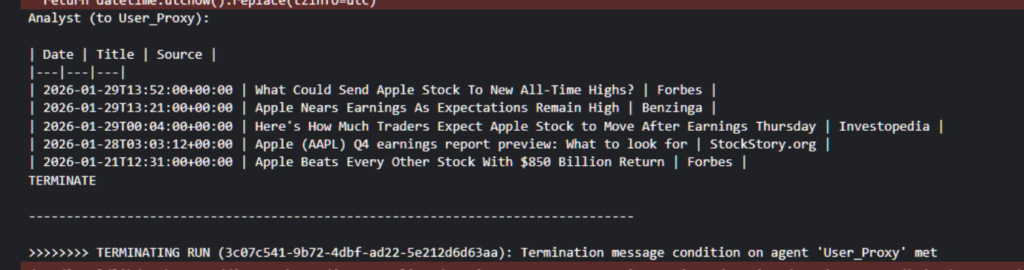
The Result: It worked, but it was anxious. During my test, the agent found the news perfectly but it was giving warnings again and again so i have to supress them and the result is in the image below:
Test 2: The CrewAI Experience
Next, I wiped the notebook and tried CrewAI.
The Code: The difference was jarring. I didn’t have to create a “Fake User.” I just defined a Task.
Useful Links
- The Era of Small Language Models (SLMs): Why 2026 Belongs to Edge AI
- How to Build AI Agents with LangChain and CrewAI (The Complete 2026 Guide)
- Beyond the Chatbot: Why 2026 is the Year of Agentic AI
- Why Developers Are Moving from ChatGPT to Local LLMs (2025)
- LangChain vs. LlamaIndex (2026): Which AI Framework Should You Choose?
- Toil is Back: Why Even with AI, SREs Feel the Burn in 2025
# 1. INSTALL COMMANDS (Run this cell first if needed)
# !pip install crewai langchain-community duckduckgo-search google-generativeai

import os
from crewai import Agent, Task, Crew, Process, LLM
from crewai.tools import tool
from langchain_community.tools import DuckDuckGoSearchRun

# --- 2. CONFIGURATION ---
# We use the same model as your AutoGen test for a fair comparison
os.environ["GOOGLE_API_KEY"] = "YOUR_GOOGLE_API_KEY" # <--- Paste your key here

# Initialize Gemini 2.5 Flash
gemini_llm = LLM(
    model="gemini/gemini-2.5-flash",
    temperature=0.7
)

# --- 3. THE TOOL (FIXED) ---
# We wrap the LangChain tool in the @tool decorator to fix the Pydantic error
@tool("DuckDuckGoSearch")
def search_tool(query: str):
    """Search the web for information on a topic."""
    return DuckDuckGoSearchRun().run(query)

# --- 4. THE AGENT ---
analyst = Agent(
    role='Senior Stock Analyst',
    goal='Analyze stock market trends and news',
    backstory='You are an expert financial reporter known for concise summaries.',
    tools=[search_tool],
    verbose=True,
    llm=gemini_llm  # Explicitly using Gemini
)

# --- 5. THE TASK ---
# Notice: No "Termination Logic" needed. Just a clear description.
analysis_task = Task(
    description='Find the latest news on AAPL (Apple Inc.). Summarize the top 3 headlines.',
    agent=analyst,
    expected_output='A Markdown list with 3 bullet points summarizing the news.'
)

# --- 6. EXECUTION ---
crew = Crew(
    agents=[analyst],
    tasks=[analysis_task],
    process=Process.sequential
)

print("Starting CrewAI Job...")
result = crew.kickoff()
print("\n\n########################")
print("## FINAL RESULT ##")
print("########################\n")
print(result)
The Result: It ran once. It printed the summary. It stopped. There was no negotiation. The agent didn’t ask me “Is there anything else?” because I didn’t program it to chat—I programmed it to work(and guess what i used both of the Google’s products(Gemini+kaggle=Killer Combo).

The Verdict: Why I’m Choosing CrewAI
After running this head-to-head test today, the “Crash” in AutoGen’s data makes perfect sense to me.
- Efficiency Wins: Developers in 2026 are tired of “Chat Loops.” We want to build pipelines. CrewAI’s linear process (
Task A->Task B) is just safer for production. - Code Readability: The CrewAI code I wrote above is readable by anyone. The AutoGen code requires you to understand “Proxies,” “Initiate Chats,” and “Termination Conditions.”
My Conclusion: If you are building a simulation? Use AutoGen. If you are building an app? Use CrewAI.
The friction I felt in those 30 minutes with AutoGen was enough to convince me. I’m sticking with the framework that respects my time.
(Note: If you run this test yourself and hit Pydantic errors with CrewAI tools, check out my fix guide here: How to Build AI Agents with LangChain & CrewAI).
Frequently Asked Questions
Q: Is Microsoft AutoGen actually dead?
A: Not for academic research. Microsoft AutoGen is still excellent for simulating complex, chaotic multi-agent conversations. However, for production applications (SaaS, internal tools), the developer community is aggressively migrating to CrewAI due to its stability and ease of use.
Q: Which is better for beginners: AutoGen or CrewAI?
A: CrewAI is significantly easier for beginners. It uses standard Python classes and readable “Task” descriptions. AutoGen requires understanding complex concepts like “User Proxies,” “Chat Initiation,” and “Termination Conditions,” which has a steeper learning curve.
Q: How do I stop AutoGen from looping forever?
The “Infinite Loop” is the most common error in AutoGen. To fix it, you must define a strict lambda function in your UserProxyAgent (e.g., is_termination_msg=lambda x: "TERMINATE" in x.get("content")). Even then, if the LLM fails to output the exact keyword, the loop continues. CrewAI avoids this entirely by using a sequential process.
Q: Can I use local LLMs (Ollama) with CrewAI?
A: Yes. Both frameworks support local models via Ollama. However, CrewAI’s integration is generally smoother because it relies on the standard LangChain ecosystem, which has robust support for local inference.
Q: Is CrewAI free to use?
Yes, CrewAI is open-source and free (MIT License). There is a paid “Enterprise” version for companies needing advanced UI and management features, but the core Python framework used in this guide is 100% free.

🚀 Let's Build Something Amazing Together
Hi, I'm Abdul Rehman Khan, founder of Dev Tech Insights & Dark Tech Insights. I specialize in turning ideas into fast, scalable, and modern web solutions. From startups to enterprises, I've helped teams launch products that grow.
- ⚡ Frontend Development (HTML, CSS, JavaScript)
- 📱 MVP Development (from idea to launch)
- 📱 Mobile & Web Apps (React, Next.js, Node.js)
- 📊 Streamlit Dashboards & AI Tools
- 🔍 SEO & Web Performance Optimization
- 🛠️ Custom WordPress & Plugin Development