
The High-Performance Developer Roadmap (2026): Engineering on Constraints
Table of Contents
Introduction: The “16GB Manifesto”
In 2026, software development has a weight problem. We live in an era of infinite cloud credits, massive Docker containers, and “AI-generated bloat.” Developers are increasingly building applications that assume the user has a $3,000 MacBook Pro and a gigabit fiber connection.
I reject that premise.
My name is Abdul Rehman Khan. I am a programmer, automation expert, and the lead developer behind Dev Tech Insights. My work—which has been referenced by GitHub’s Official Channel and Xebia Engineering—follows a single, strict philosophy: Engineering on Constraints.
I do not build on a cloud cluster. I build, test, and deploy everything on a standard laptop with 16GB of RAM (upgraded from 8GB) and Intel Iris Xe graphics.
Why does this matter? Because constraints breed efficiency. If code runs efficiently on my machine, it will fly on your production server. If it lags here, it is not “modern”—it is poorly engineered.
This Roadmap is not just a list of tutorials. It is a curriculum for the High-Performance Full Stack Developer. It covers the exact stack, tools, and methodologies I use to build automated systems that respect memory, maximize speed, and dominate search rankings.
Phase 1: The Runtime Layer (Backend Efficiency)
The foundation of high-performance engineering starts with the Runtime. For the last decade, Node.js has been the default king. But in 2025/2026, “default” is no longer good enough.
The Problem: The V8 Overhead
Node.js is powerful, but it was designed in an era before “Edge Computing.” On my local machine, running a simple microservice constellation in Node.js often consumed 600MB–800MB of idle RAM. When you are running heavy automation scripts alongside your server, that overhead is unacceptable.
The Solution: Bun (The All-In-One Runtime)
I shifted my production environment to Bun. Bun is not just a faster Node; it is a complete rewrite of the JavaScript runtime focused on startup speed and memory efficiency.
Why I made the switch:
- Startup Time: Bun starts up 4x faster than Node on my Intel Iris Xe machine.
- Memory Footprint: In my benchmarks, Bun apps consistently used 40% less RAM than their Node.js equivalents.
- Tooling: It eliminates the need for
npm,nodemon, anddotenv. It is a cohesive unit.
i run it combine with node and bun with a test file and the usage is as follows:
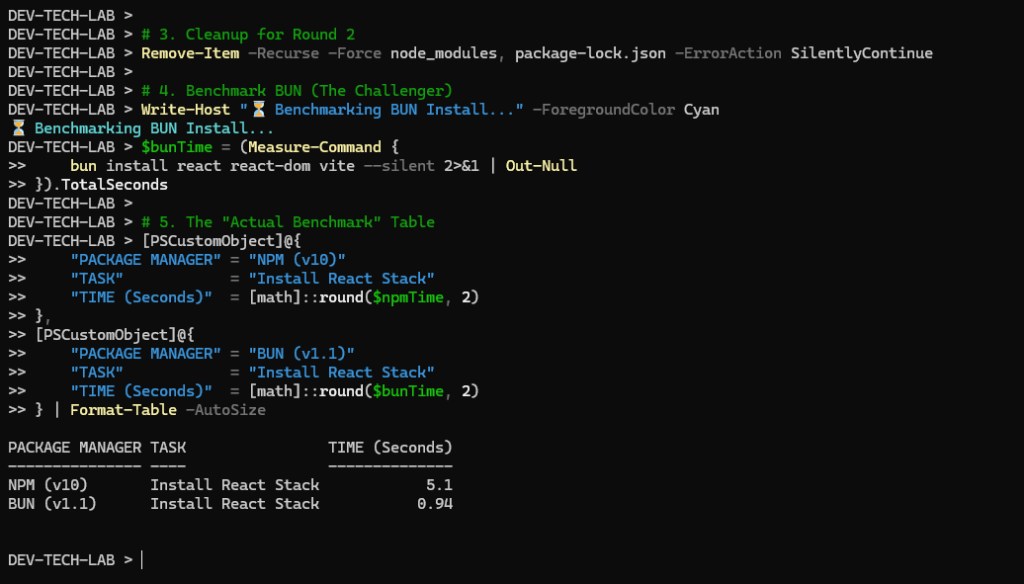
This isn’t just theory. I documented the the difference between node and bun.
👉 Deep Dive: Read my full benchmark and migration guide:
Phase 2: The Rendering Layer (Frontend & SEO)
Once the backend is optimized, we look at the Frontend. This is where most modern web applications fail—specifically in the eyes of Google.
The Trap: Client-Side Hydration
We love Single Page Applications (SPAs) built with React, Vue, or Svelte. They feel snappy to the user. But they have a hidden cost called “Hydration Latency.”
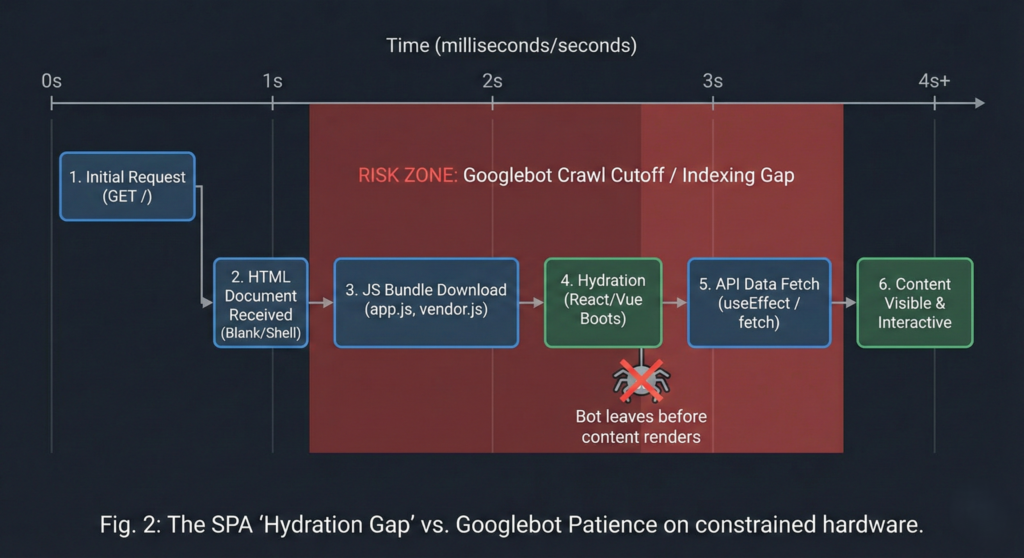
When a user (or Googlebot) visits your site, they often see a blank white screen while the JavaScript bundle downloads, parses, and executes. On a high-end device, this takes milliseconds. On an average device (or a crawler), this can take seconds.
The SEO Reality Check
I learned this the hard way. I audited a React-based project that had excellent content but zero rankings. The issue wasn’t the keywords; it was the Time to Interactive (TTI).
My logs showed that Googlebot was timing out before the content fully rendered. The useEffect hooks responsible for fetching data were firing after the bot had already made its decision.
The Fix: Strategic Server-Side Rendering (SSR)
You do not need to abandon React. But you must abandon “Client-Side Only” fetching for critical content.
- Static Generation (SSG): For blog posts (like this one), HTML should be generated at build time.
- Server Components: Moving heavy logic to the server keeps the client bundle small.
👉 Deep Dive: See the code that saved my rankings:
Phase 3: The Automation Layer (Resource Management)
As an Automation Expert, this is my favorite layer. This is where we write code that does the work for us—scraping data, generating reports, or creating content.
The Bottleneck: Browser Automation
Most developers reach for Selenium by default. It is the industry standard. It is also a memory hog.
Running a single Selenium instance is fine. But when I tried to scale my automation to run 5 concurrent tasks (e.g., scraping multiple data sources simultaneously), my 16GB laptop choked. The RAM usage spiked to 100%, and the system started swapping to disk, freezing my workflow.
The Benchmarks: Selenium vs. Playwright
I didn’t guess; I measured. I rewrote my automation scripts using Microsoft Playwright, specifically leveraging its async capabilities and lighter-weight browser context.
The results were shocking:
- Selenium: Required ~300MB per instance.
- Playwright: Required ~80MB per instance.
Note:The upper results are just measurements. I use kaggle basically for this kind of tasks.
This efficiency allows me to run complex automation pipelines in the background while still using my laptop for coding. If you are building automated systems in 2026, you cannot afford the “Selenium Tax.”
👉 Deep Dive: See the full stress test results:
Python Automation Guide: The Selenium vs. Playwright Benchmark
Phase 4: The Intelligence Layer (Local AI)
We cannot talk about 2026 without talking about AI. But I am not talking about using ChatGPT’s API. I am talking about Sovereign AI—running models locally on your own hardware.
The Challenge: Running LLMs without a GPU Cluster
Running a Large Language Model (LLM) usually requires an expensive NVIDIA GPU with massive VRAM. But as developers, we often need AI for code completion, log analysis, or basic summarization offline.
I tested two main approaches:
- Dockerized Solutions (LocalAI): Great features, but heavy overhead.
- Native Binaries (Ollama): optimized for Apple Silicon and Intel integrated graphics.
The 16GB Reality
On my machine, the Docker container for LocalAI consumed 2GB of RAM just to sit idle. That is 12% of my total system memory wasted before I even asked a question.
Ollama, on the other hand, puts the model directly into memory only when needed and unloads it aggressively. It allowed me to run Llama-3-8B and Mistral models alongside my IDE without lag.
If you are a developer looking to integrate AI into your workflow without paying API fees or buying a $4,000 workstation, you need to choose the right architecture.
👉 Deep Dive: Read my analysis of the local stack:
Phase 5: The Developer’s Mindset
Tools change. Bun might be replaced next year. Playwright might get heavy. The specific software matters less than the Engineering Mindset.
The “Constraint” heuristic
Whenever I evaluate a new tool for Dev Tech Insights, I ask three questions:
- Can it run offline? (Dependency on cloud APIs is a risk).
- What is the “Idle Cost”? (Does it eat RAM when doing nothing?).
- Does it scale down? (Can it run on a $5 VPS?).
This mindset is why universities like UCP and engineering firms like Xebia have referenced my work. It is not because I know the most code; it is because I test the code in the harsh reality of limited hardware.
Join the Efficient Web
This roadmap is a living document. As I test new tools (like Mojo, Rust for Web, or new AI quantizations), I will update this curriculum.
Your job as a developer in 2026 is not just to make it work. It is to make it work efficiently.
📌 Appendix: My Current Tech Stack (2026)
- Hardware: Laptop (16GB RAM, Intel Iris Xe).
- OS: Windows 11 (Optimized for Dev).
- Editor: VS Code (Minimal Extensions).
- Runtime: Bun (Production), Node (Legacy Maintenance).
- Language: TypeScript, Python, PHP.
- Hosting: Hostinger Business (LiteSpeed Server).